Authentication & Authorization
Scoriet implements a production-grade authentication system using OAuth2 with Laravel Passport. This document explains how users authenticate, how tokens work, and how permissions are enforced.
Authentication Overview
Scoriet uses OAuth2 Password Grant Flow for user authentication. This approach combines the security of OAuth2 with the simplicity of traditional username/password login, making it ideal for desktop-like applications.
Key Principles
- Stateless Authentication: No server-side sessions; security relies on JWT tokens
- Token-Based API: All API requests authenticated via Bearer tokens
- Secure Token Storage: JWT tokens stored in browser localStorage
- Automatic Refresh: Tokens automatically refresh before expiration
- Role-Based Access Control: Users have roles with specific permissions
Architecture Diagram
OAuth2 Password Grant Flow
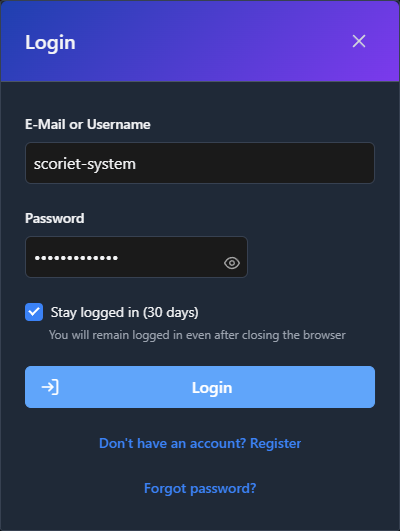 OAuth2 login dialog with email/password authentication and session management
Step 1: User Registration
Users can create accounts through the registration endpoint.
Endpoint: POST /api/auth/register
// Frontend (React)
const register = async (email, password, name) => {
  const response = await fetch('/api/auth/register', {
    method: 'POST',
    headers: { 'Content-Type': 'application/json' },
    body: JSON.stringify({ email, password, name })
  });
  return response.json();
};
Backend Validation:
- Email uniqueness check
- Password strength validation (minimum requirements)
- Encrypted password storage using bcrypt
Step 2: User Login (OAuth2 Password Grant)
When a user logs in, the frontend exchanges credentials for an access token.
Endpoint: POST /api/oauth/token
// Frontend (React)
const login = async (email, password) => {
  const response = await fetch('/api/oauth/token', {
    method: 'POST',
    headers: { 'Content-Type': 'application/json' },
    body: JSON.stringify({
      grant_type: 'password',
      client_id: process.env.VITE_PASSPORT_CLIENT_ID,
      client_secret: process.env.VITE_PASSPORT_CLIENT_SECRET,
      username: email,
      password: password,
      scope: '*'
    })
  });

  const data = await response.json();
  // Store tokens
  localStorage.setItem('access_token', data.access_token);
  localStorage.setItem('refresh_token', data.refresh_token);
  localStorage.setItem('expires_in', data.expires_in);

  return data;
};
Backend Process (in Laravel Passport):
- Validate client credentials (client_id and client_secret)
- Check if grant_type is 'password'
- Look up user by username (email)
- Verify password against bcrypt hash
- Issue JWT access token (valid 1 hour by default)
- Issue refresh token (valid 1 month by default)
Response Format:
{
  "token_type": "Bearer",
  "expires_in": 3600,
  "access_token": "eyJ0eXAiOiJKV1QiLCJhbGc...",
  "refresh_token": "def50200abcdef123..."
}
Step 3: Making Authenticated Requests
All API requests include the access token in the Authorization header.
// Frontend (React)
const apiCall = async (endpoint, options = {}) => {
  const token = localStorage.getItem('access_token');

  const response = await fetch(endpoint, {
    ...options,
    headers: {
      ...options.headers,
      'Authorization': `Bearer ${token}`,
      'Content-Type': 'application/json'
    }
  });

  if (response.status === 401) {
    // Token expired, refresh it
    await refreshToken();
    return apiCall(endpoint, options); // Retry
  }

  return response.json();
};
Backend Verification (auth:api Middleware):
// Laravel Middleware
Route::middleware('auth:api')->group(function () {
    Route::get('/user', function (Request $request) {
        return $request->user();
    });
});
The middleware:
- Extracts JWT from Authorization header
- Validates JWT signature using Passport key
- Checks token expiration time
- Loads associated User model
- Makes user available via
auth()->user()
Step 4: Token Refresh
Before the access token expires, the frontend can use the refresh token to get a new access token without requiring the user to log in again.
// Frontend (React)
const refreshToken = async () => {
  const refresh_token = localStorage.getItem('refresh_token');

  const response = await fetch('/api/oauth/token', {
    method: 'POST',
    headers: { 'Content-Type': 'application/json' },
    body: JSON.stringify({
      grant_type: 'refresh_token',
      client_id: process.env.VITE_PASSPORT_CLIENT_ID,
      client_secret: process.env.VITE_PASSPORT_CLIENT_SECRET,
      refresh_token: refresh_token,
      scope: '*'
    })
  });

  const data = await response.json();
  localStorage.setItem('access_token', data.access_token);
  localStorage.setItem('refresh_token', data.refresh_token);
  localStorage.setItem('expires_in', data.expires_in);
};
Step 5: User Logout
Logout removes tokens from the client. The server doesn't maintain a blacklist; expired tokens are automatically invalid.
// Frontend (React)
const logout = async () => {
  localStorage.removeItem('access_token');
  localStorage.removeItem('refresh_token');
  localStorage.removeItem('expires_in');
  // Redirect to login page
  window.location.href = '/login';
};
JWT Token Structure
JWT tokens consist of three parts separated by dots: header.payload.signature
Header
{
  "typ": "JWT",
  "alg": "RS256"
}
Payload
{
  "aud": "passport_client_id",
  "iss": "https://scoriet.example.com",
  "jti": "unique_token_id",
  "iat": 1705324800,
  "exp": 1705328400,
  "nbf": 1705324800,
  "sub": "user_id_123",
  "scope": "*"
}
Key Fields:
sub: Subject (user ID)iat: Issued at (timestamp)exp: Expiration time (timestamp)aud: Audience (client ID)scope: Granted scopes (permissions)
Signature
HMACSHA256(
  base64UrlEncode(header) + "." +
  base64UrlEncode(payload),
  secret_key
)
The signature is generated using a secret key that only the server knows. This ensures tokens cannot be forged or modified by clients.
Environment Configuration
Required Environment Variables
# OAuth2 Passport Configuration
PASSPORT_PERSONAL_ACCESS_CLIENT_ID=your_personal_client_id
PASSPORT_PERSONAL_ACCESS_CLIENT_SECRET=your_personal_client_secret
PASSPORT_PASSWORD_GRANT_CLIENT_ID=your_password_grant_client_id
PASSPORT_PASSWORD_GRANT_CLIENT_SECRET=your_password_grant_client_secret

# Frontend OAuth Configuration
VITE_PASSPORT_CLIENT_ID=your_password_grant_client_id
VITE_PASSPORT_CLIENT_SECRET=your_password_grant_client_secret

# Token Configuration
SESSION_DRIVER=database
SESSION_LIFETIME=60

# API Authentication
API_GUARD=passport
Setup Instructions
Generate OAuth2 clients during installation:
# Generate encryption key
php artisan key:generate

# Create OAuth2 clients
php artisan passport:install

# Output will show:
# Personal access client created successfully.
# Client ID: 1
# Client secret: xxxxx

# Password grant client created successfully.
# Client ID: 2
# Client secret: xxxxx
Copy the password grant client credentials to .env:
VITE_PASSPORT_CLIENT_ID=2
VITE_PASSPORT_CLIENT_SECRET=xxxxx
User Model Configuration
The User model must use the HasApiTokens trait:
// app/Models/User.php
<?php

namespace App\Models;

use Laravel\Passport\HasApiTokens;
use Illuminate\Foundation\Auth\User as Authenticatable;

class User extends Authenticatable
{
    use HasApiTokens;

    protected $fillable = [
        'name',
        'email',
        'password',
    ];

    protected $hidden = [
        'password',
        'remember_token',
    ];

    protected function casts(): array
    {
        return [
            'email_verified_at' => 'datetime',
            'password' => 'hashed',
        ];
    }
}
Passport Configuration
In app/Providers/AppServiceProvider.php:
<?php

namespace App\Providers;

use Laravel\Passport\Passport;
use Illuminate\Support\ServiceProvider;

class AppServiceProvider extends ServiceProvider
{
    public function boot(): void
    {
        // Enable password grant for Scoriet
        Passport::enablePasswordGrant();

        // Configure token lifetimes
        Passport::tokensExpireIn(now()->addHours(1));
        Passport::refreshTokensExpireIn(now()->addDays(30));

        // Configure scopes
        Passport::scopes([
            'read' => 'Read resources',
            'write' => 'Write resources',
            'admin' => 'Administrative access',
        ]);
    }
}
Authorization & Permissions
User Roles
Scoriet uses role-based access control. Users can have multiple roles:
| Role | Permissions | Use Case |
|---|---|---|
user | Create generators, templates, projects | Standard user |
developer | + API key management | API consumers |
admin | + User management, billing, system config | Team administrators |
super_admin | All permissions | Platform administrators |
Role Assignment
// Assign role to user
$user->assignRole('developer');

// Check role
if ($user->hasRole('admin')) {
    // Admin-only operations
}

// Check permission
if ($user->can('create', Generator::class)) {
    // Can create generators
}
Policy-Based Authorization
Scoriet uses Laravel Policies for resource authorization:
// app/Policies/GeneratorPolicy.php
<?php

namespace App\Policies;

use App\Models\User;
use App\Models\Generator;

class GeneratorPolicy
{
    public function view(User $user, Generator $generator): bool
    {
        // User can view their own generators
        return $generator->user_id === $user->id ||
               $generator->team_id === $user->current_team_id;
    }

    public function update(User $user, Generator $generator): bool
    {
        return $this->view($user, $generator) &&
               $user->hasRole('admin');
    }

    public function delete(User $user, Generator $generator): bool
    {
        return $generator->user_id === $user->id &&
               $user->hasRole('admin');
    }
}
Usage in Controllers:
// app/Http/Controllers/Api/GeneratorController.php
public function update(Request $request, Generator $generator)
{
    $this->authorize('update', $generator);

    // Authorized, proceed with update
    $generator->update($request->validated());

    return response()->json($generator);
}
Team-Based Access Control
Users can belong to multiple teams. Resources are scoped to teams:
// Get generators for current team
$generators = Generator::where('team_id', auth()->user()->current_team_id)->get();

// Check team membership
if (!auth()->user()->belongsToTeam($team)) {
    abort(403, 'Unauthorized');
}
API Token Management
For server-to-server or headless access, users can create personal API tokens:
Endpoint: POST /api/api-tokens
const createApiToken = async (tokenName) => {
  const response = await fetch('/api/api-tokens', {
    method: 'POST',
    headers: {
      'Authorization': `Bearer ${accessToken}`,
      'Content-Type': 'application/json'
    },
    body: JSON.stringify({ name: tokenName })
  });

  const data = await response.json();
  return data.plainTextToken; // Only shown once!
};
Using API Tokens:
curl -H "Authorization: Bearer your-api-token" \
     https://scoriet.example.com/api/generators
Security Best Practices
Frontend Security
- Never expose client secret in frontend code (it's only used server-to-server)
- Validate tokens before using (check expiration time)
- Handle 401 responses by refreshing token and retrying
- Clear tokens on logout from localStorage
- Use HTTPS only in production (tokens sent in headers)
Backend Security
- Validate all tokens on every protected request
- Check token expiration in addition to signature
- Never log sensitive token data in production logs
- Implement rate limiting on auth endpoints
- Monitor suspicious authentication patterns (brute force)
Token Security
- Short token lifetime (1 hour default)
- Separate refresh tokens with longer lifetime
- Secure token storage (never in URL parameters)
- HTTPS transport (prevents token interception)
- Token rotation on privilege escalation
Troubleshooting Authentication
Common Issues
Problem: "Unauthenticated" (401) on API requests
Solutions:
// 1. Check token exists
const token = localStorage.getItem('access_token');
if (!token) redirect to login;

// 2. Check token not expired
const expiresIn = localStorage.getItem('expires_in');
const issuedAt = localStorage.getItem('issued_at');
if (Date.now() - issuedAt > expiresIn * 1000) {
  await refreshToken();
}

// 3. Check header format
// Wrong: Authorization: JWT token
// Correct: Authorization: Bearer token
Problem: OAuth token endpoint returns 400
Check:
// 1. Verify client credentials in .env
VITE_PASSPORT_CLIENT_ID=correct_client_id
VITE_PASSPORT_CLIENT_SECRET=correct_secret

// 2. Run migrations
php artisan migrate

// 3. Recreate OAuth clients
php artisan passport:install

// 4. Verify User model has HasApiTokens trait
use Laravel\Passport\HasApiTokens;
class User extends Authenticatable {
    use HasApiTokens;
}
Problem: "Token is invalid" after deployment
Causes:
- Encryption keys changed (app key rotated)
- Passport keys regenerated
- Database migrated without client data
Solution:
# Backup old keys
cp storage/oauth-public.key storage/oauth-public.key.bak
cp storage/oauth-private.key storage/oauth-private.key.bak

# Regenerate clients
php artisan passport:install
Password Reset Flow
Step 1: User Requests Password Reset
Endpoint: POST /api/auth/forgot-password
const requestPasswordReset = async (email) => {
  const response = await fetch('/api/auth/forgot-password', {
    method: 'POST',
    headers: { 'Content-Type': 'application/json' },
    body: JSON.stringify({ email })
  });
  return response.json();
};
Backend sends reset token via email.
Step 2: User Clicks Email Link
Email contains link: https://scoriet.example.com/reset-password?token=xxxxx&email=user@example.com
Step 3: User Submits New Password
Endpoint: POST /api/auth/reset-password
const resetPassword = async (token, email, password) => {
  const response = await fetch('/api/auth/reset-password', {
    method: 'POST',
    headers: { 'Content-Type': 'application/json' },
    body: JSON.stringify({ token, email, password })
  });
  return response.json();
};
Backend verifies token, hashes password, sends confirmation email.
Session Invalidation
Logout from All Devices
Clear all user sessions:
Endpoint: POST /api/logout-all-devices
// app/Http/Controllers/Auth/LogoutController.php
public function logoutAllDevices(Request $request)
{
    // Revoke all tokens
    $request->user()->tokens->each(function ($token) {
        $token->revoke();
    });

    return response()->json(['message' => 'Logged out from all devices']);
}
Audit Logging
Track authentication events for security monitoring:
// Log authentication
auth()->user()->tokens()->create([
    'name' => 'Login at ' . now(),
    'event' => 'login',
    'ip_address' => request()->ip(),
    'user_agent' => request()->header('User-Agent'),
]);

// Query audit log
$logs = auth()->user()->tokens()->latest()->get();
Integration with Laravel Sanctum (Alternative)
For a lighter-weight alternative to Passport, Laravel Sanctum can be used:
Installation:
php artisan vendor:publish --provider="Laravel\Sanctum\SanctumServiceProvider"
php artisan migrate
Configuration (app/Models/User.php):
use Laravel\Sanctum\HasApiTokens;

class User extends Authenticatable
{
    use HasApiTokens;
}
Token issuance:
$token = $user->createToken('auth-token')->plainTextToken;
Scoriet's authentication system is battle-tested and secure. It balances industry best practices with ease of development and deployment.
For more details on implementation, see the Project Structure document showing where authentication code lives, or check the Architecture Overview for how authentication fits into the larger system.