Kanban Board
Overview
The Kanban Board provides visual task management with a column-based workflow system. Teams organize work into customizable columns with WIP (Work In Progress) limits, track progress with cards, and collaborate through comments and activity tracking.
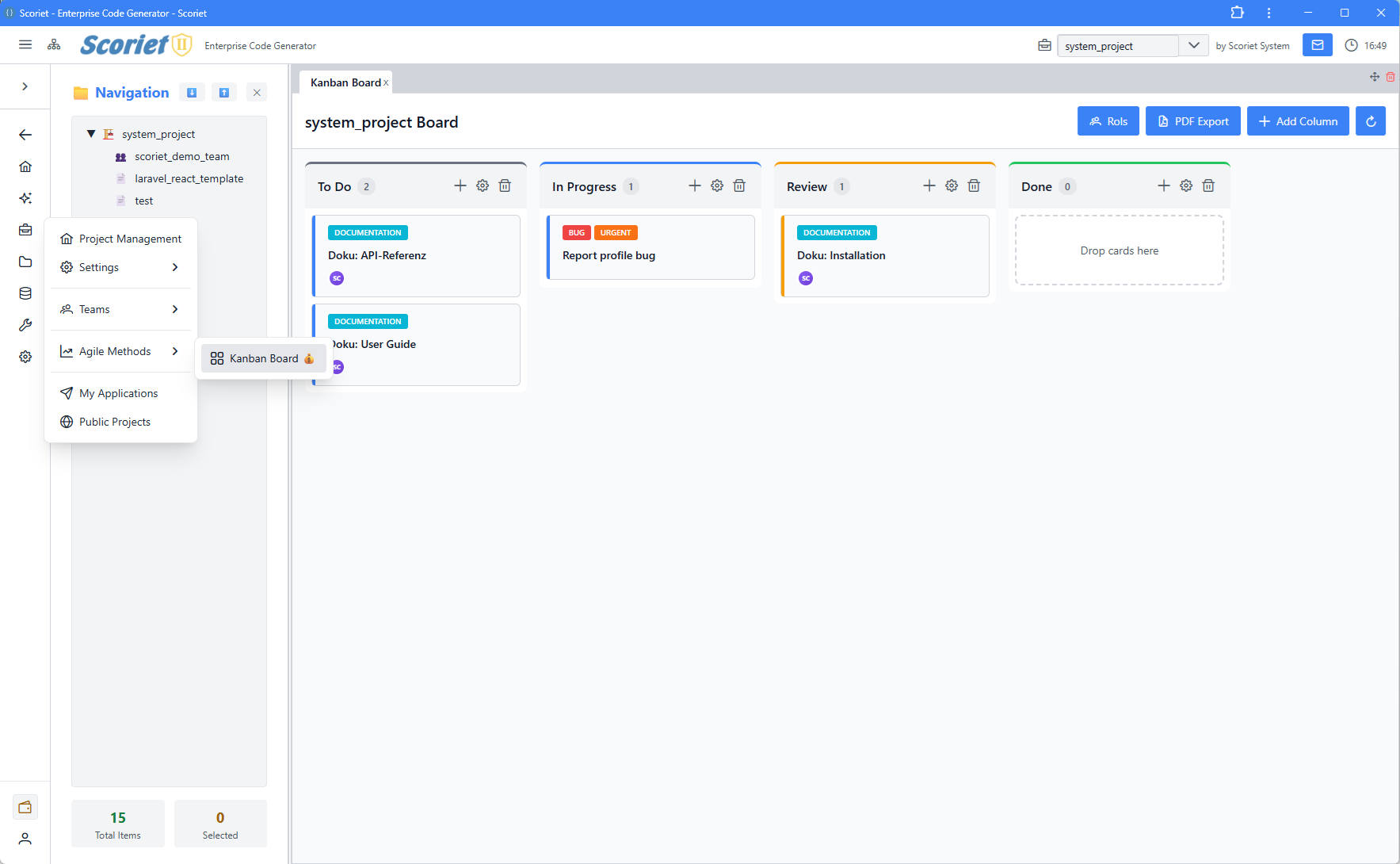 Kanban Board with drag-and-drop columns, cards, and team collaboration features
Key Features
- Column-Based Workflow - Drag-and-drop cards between columns
- WIP Limits - Prevent bottlenecks with work-in-progress constraints
- Card Properties - Priority, due dates, estimated hours, assignees
- Collaboration - Comments, activity logs, read receipts
- Assignee Management - Team member assignment with roles
- Labels & Filtering - Organize cards with custom labels
- Role-Based Visibility - SRM, SDM, Flow Manager roles
- Real-time Updates - WebSocket support for live collaboration
Core Data Structures
interface KanbanCard {
  id: number;
  title: string;
  description?: string;
  priority: 'low' | 'medium' | 'high';
  status: string;
  due_date?: string;
  estimated_hours?: number;
  assignees?: Assignee[];
  labels?: KanbanLabel[];
  comments?: Comment[];
  activities?: Activity[];
  created_at: string;
  updated_at: string;
}

interface KanbanColumn {
  id: number;
  name: string;
  wip_limit?: number;
  position: number;
  cards?: KanbanCard[];
  card_count?: number;
}

interface Assignee {
  id: number;
  username?: string;
  name?: string;
  avatar_url?: string | null;
  initials?: string;
  color?: string;
  kanban_role?: string | null;
  kanban_role_short?: string | null;
  kanban_role_color?: string | null;
}

interface KanbanLabel {
  id: number;
  name: string;
  color: string;
}
Column Management
Create Column
Board → New Column → Name: "In Progress"
Set WIP Limit: 5 (optional)
Position: Auto-ordered
WIP Limits
Work In Progress limits prevent bottlenecks:
// Check WIP before dropping card
const canDropCard = (column: KanbanColumn, newCard: KanbanCard) => {
  if (!column.wip_limit) return true;
  const currentCount = column.cards?.length || 0;
  return currentCount < column.wip_limit;
};

// Visual feedback when limit exceeded
if (column.cards.length >= column.wip_limit) {
  showWarning(`Column "${column.name}" has reached WIP limit`);
}
Card Management
Card Properties
interface CardForm {
  title: string;           // Required
  description?: string;    // Optional markdown
  priority: 'low' | 'medium' | 'high';
  due_date?: string;       // ISO format
  estimated_hours?: number;
  assignees?: number[];    // User IDs
  labels?: number[];       // Label IDs
}
Card Priority
High - Urgent, blockers, critical work
Medium - Normal priority, should complete soon
Low - Nice-to-have, can defer if needed
Estimated Hours
Track time estimates for capacity planning:
// Sum by assignee or column
const totalHours = cards.reduce((sum, card) =>
  sum + (card.estimated_hours || 0), 0
);

const assigneeLoad = cards
  .filter(c => c.assignees.some(a => a.id === userId))
  .reduce((sum, c) => sum + (c.estimated_hours || 0), 0);
Assignee Management
Team Member Assignment
interface TeamMember {
  id: number;
  username: string;
  email: string;
  avatar_url?: string | null;
  initials: string;
  color: string;
  kanban_role?: string | null;
  kanban_role_short?: string | null;
}
Kanban Roles
SRM - Scrum Master/Resource Manager
SDM - Software Development Manager
Flow Manager - Process improvement
Assign to Card
Card → Assignees → Select Team Members
Multiple assignees supported
View assignee avatar/initials on card
Card Workflow
Drag and Drop
Using dnd-kit library:
import { DndContext, DragEndEvent } from '@dnd-kit/core';

const handleDragEnd = async (event: DragEndEvent) => {
  const { active, over } = event;

  if (!over) return;

  const cardId = active.id;
  const targetColumnId = over.id;

  // Update card status
  await updateCard(cardId, {
    status: targetColumnId
  });
};
Card Movement History
Activity log tracks card movements:
{
  type: 'card_moved',
  from_column: 'backlog',
  to_column: 'in_progress',
  actor: 'john.doe',
  timestamp: '2026-04-13T10:30:00Z'
}
Comments & Collaboration
Comment Thread
interface Comment {
  id: number;
  card_id: number;
  author: User;
  body: string;
  attachments?: Attachment[];
  created_at: string;
  updated_at: string;
  replies?: Comment[];
}

// Add comment
const handleAddComment = async (body: string, attachments?: File[]) => {
  const formData = new FormData();
  formData.append('body', body);
  attachments?.forEach((file, i) => {
    formData.append(`attachments[${i}]`, file);
  });

  await fetch(`/api/cards/${cardId}/comments`, {
    method: 'POST',
    body: formData,
    headers: { 'Authorization': `Bearer ${token}` }
  });
};
Activity Log
Tracks all card activities:
interface Activity {
  id: number;
  card_id: number;
  type: 'created' | 'updated' | 'commented' | 'moved' | 'assigned';
  actor: User;
  description: string;
  changes?: Record<string, unknown>;
  created_at: string;
}
Labels
Label Management
// Create label
const label = {
  name: 'Feature',
  color: '#3b82f6'  // Blue
};

// Assign to card
card.labels = [label];

// Filter by labels
const filteredCards = cards.filter(c =>
  c.labels.some(l => l.id === selectedLabelId)
);
Filtering & Sorting
Filter Options
// By assignee
cards.filter(c => c.assignees.some(a => a.id === userId));

// By priority
cards.filter(c => c.priority === 'high');

// By label
cards.filter(c => c.labels.some(l => l.name === 'bug'));

// By due date (overdue)
cards.filter(c => new Date(c.due_date) < new Date());

// By column
const columnCards = column.cards || [];
Sort Options
// Sort by priority
cards.sort((a, b) =>
  priorityOrder[a.priority] - priorityOrder[b.priority]
);

// Sort by due date
cards.sort((a, b) =>
  new Date(a.due_date) - new Date(b.due_date)
);

// Sort by estimated hours
cards.sort((a, b) =>
  (b.estimated_hours || 0) - (a.estimated_hours || 0)
);
Real-time Updates
WebSocket Subscription
// Subscribe to board updates
const channel = getEcho().channel(`kanban-board.${boardId}`);

channel.listen('CardMoved', (data) => {
  updateCardPosition(data.card_id, data.new_column_id);
});

channel.listen('CardUpdated', (data) => {
  updateCard(data.card_id, data.changes);
});

channel.listen('CardCreated', (data) => {
  addCard(data.card);
});
API Endpoints
# Board operations
GET    /api/kanban-boards/{id}           # Get board
PUT    /api/kanban-boards/{id}           # Update board

# Columns
POST   /api/kanban-columns               # Create column
PUT    /api/kanban-columns/{id}          # Update column
DELETE /api/kanban-columns/{id}          # Delete column

# Cards
POST   /api/kanban-cards                 # Create card
GET    /api/kanban-cards/{id}            # Get card
PUT    /api/kanban-cards/{id}            # Update card
DELETE /api/kanban-cards/{id}            # Delete card
POST   /api/kanban-cards/{id}/move       # Move card

# Comments
POST   /api/kanban-cards/{id}/comments   # Add comment
DELETE /api/comments/{id}                # Delete comment

# Assignees
POST   /api/kanban-cards/{id}/assignees  # Add assignee
DELETE /api/assignees/{id}               # Remove assignee
Best Practices
- Limit Columns - 5-7 columns for clarity
- Set Realistic WIP Limits - Based on team capacity
- Update Regularly - Keep cards current
- Use Clear Titles - Descriptive card names
- Assign Ownership - Clear responsibility
- Review Activities - Track what changed and why
- Archive Completed - Clean up finished cards
- Communicate Changes - Use comments for discussion
Workflow Examples
Software Development
Columns: Backlog → Design → In Progress → Review → Testing → Done
WIP Limits: 1 → 2 → 3 → 2 → 2 → ∞
Content Production
Columns: Ideas → Outline → Draft → Review → Final → Published
WIP Limits: ∞ → 3 → 3 → 2 → 2 → ∞
Customer Support
Columns: New → Assigned → In Progress → Waiting for Info → Resolved → Closed
WIP Limits: ∞ → 5 → 10 → 3 → ∞ → ∞
Troubleshooting
Cards Not Updating
- Check WebSocket connection
- Verify permission to edit card
- Refresh board if stale
WIP Limit Not Enforcing
- Verify limit is set > 0
- Check if user has override permission
- Review column configuration
Comments Not Showing
- Ensure attachments are enabled (patron feature)
- Check comment permissions
- Verify card is not archived
Next Steps
- Messaging - Team communication
- Team Management - Manage team members
- Project Settings - Configure board