Code Generation Flow
The code generation flow is the complete process from selecting a template to delivering generated code files. It integrates SQL parsing, template processing, and code adjustments into a cohesive pipeline.
High-Level Flow
User Selects Project + Schema + Template
           ↓
    Load Schema Data
           ↓
    Parse Schema → Generation Tree (gtree)
           ↓
    Load Template Content
           ↓
    Validate Template & Variables
           ↓
    Process Template → JavaScript Function
           ↓
    Execute JavaScript in Browser/Backend
           ↓
    Generate Output Files
           ↓
    Apply Code Adjustments
           ↓
    Package Files (ZIP/TAR.GZ/TAR.XZ)
           ↓
    Export to FTP/SSH/Git or Download
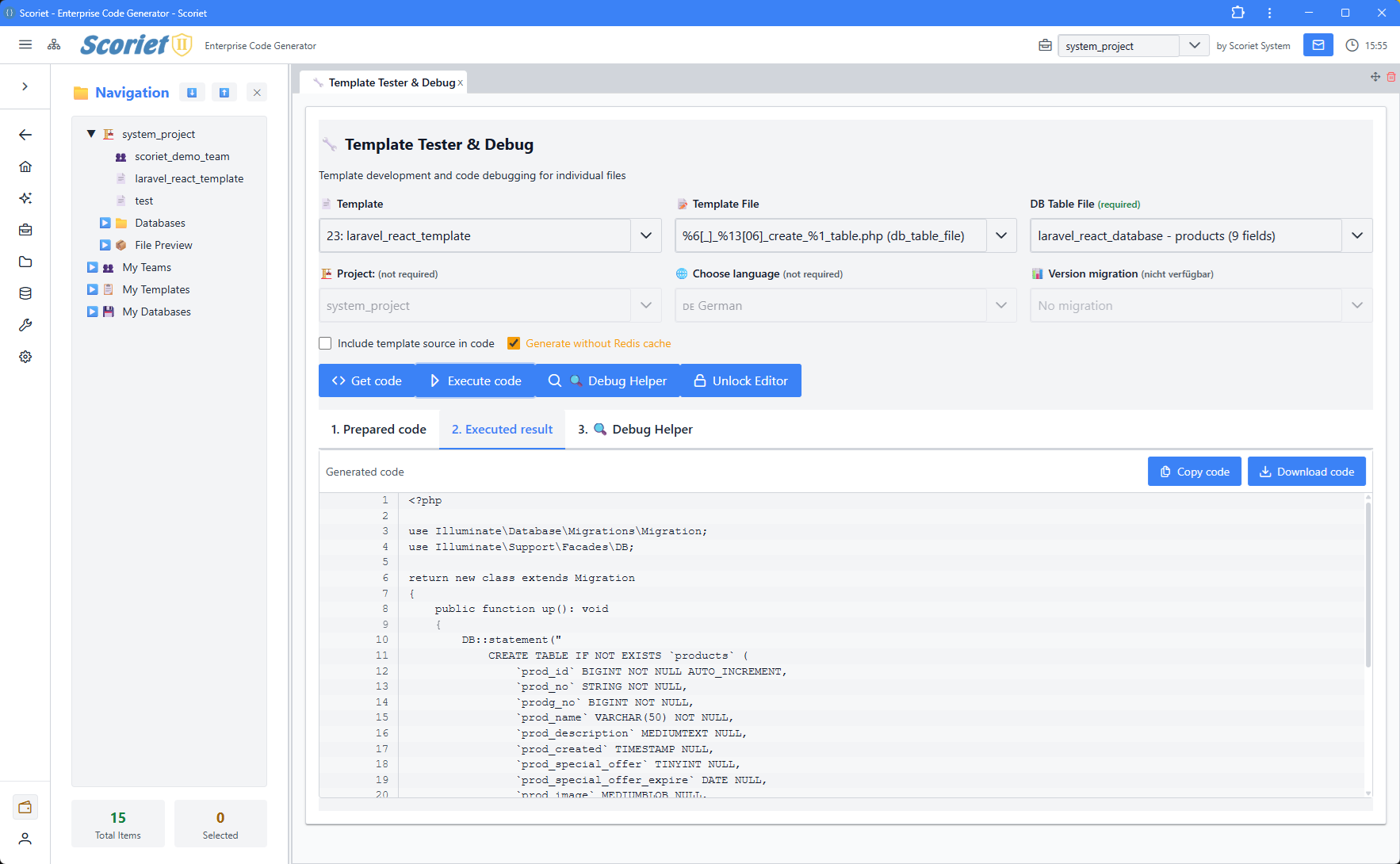 Template Tester & Debug panel for testing code generation with selected templates and database schemas
Step 1: Data Loading
Load Project Configuration
$project = Project::findOrFail($projectId);

// Project contains:
$projectData = [
    'name' => $project->name,
    'database_type' => $project->database_type,
    'project_directory' => $project->project_directory,
    'default_language' => $project->default_language,
    'settings' => $project->settings,
];
Load Schema
// Get current schema (latest version)
$schema = FloatingSchema::where('project_id', $projectId)
    ->with(['tables.fields', 'tables.constraints'])
    ->first();

if (!$schema) {
    throw new Exception('No schema defined for project');
}
Load Template
$template = Template::with('variables', 'pages')
    ->findOrFail($templateId);

// Template contains:
$templateData = [
    'name' => $template->name,
    'description' => $template->description,
    'category' => $template->category,
    'content' => $template->content,  // Main template text
];
Step 2: Build Generation Tree (gtree)
The gtree is a JavaScript object containing all data the template needs:
$gtreeBuilder = new GTreeBuilder();
$gtree = $gtreeBuilder->build(
    project: $project,
    schema: $schema,
    language: 'en',
    templateId: $templateId
);

// Result structure:
$gtree = [
    [
        'project' => [
            [
                'projectname' => 'MyApp',
                'projectid' => 1,
                'tables' => [
                    [
                        'filename' => 'users',
                        'tableindex' => 0,
                        'fields' => [
                            [
                                'name' => 'id',
                                'type' => 'BIGINT',
                                'isPrimaryKey' => true,
                                'isNullable' => false,
                                ...
                            ],
                            ...
                        ],
                        'constraints' => [
                            [
                                'constraintType' => 'FOREIGN KEY',
                                'localColumn' => 'user_id',
                                'referencedTable' => 'users',
                                ...
                            ],
                            ...
                        ]
                    ],
                    ...
                ]
            ]
        ]
    ]
];
Template Variable Values
Custom template variables are injected into gtree:
// Load project-specific variable values
$variableValues = ProjectTemplateVariableValue::where([
    'project_id' => $projectId,
    'template_id' => $templateId,
    'language' => $language
])->get();

// Add to gtree for access in template
foreach ($variableValues as $var) {
    $gtree[0]['project'][0][$var->variable_name] = $var->value;
}
Step 3: Template Validation
Syntax Validation
$engine = new UltimateTemplateEngine($gtree);
$syntaxCheck = $engine->validateTemplateSyntax($template->content);

if (!$syntaxCheck['valid']) {
    return [
        'success' => false,
        'errors' => $syntaxCheck['errors'],
        'warnings' => $syntaxCheck['warnings']
    ];
}
Variable Validation
$varCheck = $engine->validateVariablesWithContext(
    templateContent: $template->content,
    templateId: $templateId,
    projectId: $projectId,
    languageCode: 'en'
);

if (!empty($varCheck['required_missing'])) {
    return [
        'success' => false,
        'missing_variables' => $varCheck['required_missing']
    ];
}
Step 4: Template Processing
Convert to JavaScript Function
$jsFunction = $engine->processTemplate(
    templateContent: $template->content,
    functionName: 'generate',
    tableIndex: 0,  // Or null for all tables
    includeSource: config('app.debug'),
    formWindowType: 0
);

// Result:
// function generate() {
//   let sContentResult = '';
//   // Compiled template logic
//   return sContentResult;
// }
Execute Generated Function
The JavaScript function is executed to produce output:
// In browser or Node.js backend
const functionCode = generateJavaScriptFunction(); // From above
const generate = eval('(' + functionCode + ')');  // Create function object

// Execute with gtree data
const output = generate();  // Returns generated code
Step 5: File Generation
Single File Generation
$templatePage = $templatePages->first();
$filename = $this->resolveFilename(
    pattern: $templatePage->output_filename,
    variables: [
        '%1' => $table->filename,
        '%2' => $project->project_directory,
    ]
);

$generatedContent = $jsResult->output;  // From JavaScript execution

$files[$filename] = $generatedContent;
Multiple File Generation
For templates with multiple pages (different files):
foreach ($template->pages as $page) {
    // Generate for each table or iteration
    foreach ($schema->tables as $tableIndex => $table) {
        // Process each table separately
        $filename = $this->resolveFilename(
            $page->output_filename,
            ['%1' => $table->filename]
        );

        $output = $this->executeTemplate(
            $page->content,
            $gtree,
            $tableIndex
        );

        $files[$filename] = $output;
    }
}
Filename Resolution
Output filenames use placeholders:
| Placeholder | Replaced With |
|---|---|
%1 | Current table/file name |
%2 | Project directory |
%3 | Current language |
%4 | Template name |
$filename = str_replace([
    '%1' => $table->filename,
    '%2' => $project->project_directory,
    '%3' => 'en',
    '%4' => $template->name
], $templatePage->output_filename);

// Example: "src/%2/Models/%1.php"
// becomes: "src/MyApp/Models/users.php"
Step 6: Code Adjustments
Apply Post-Processing Adjustments
Code adjustments can insert code snippets into generated files:
$adjustmentService = new CodeAdjustmentService();

foreach ($files as $filename => &$content) {
    $result = $adjustmentService->apply(
        content: $content,
        filename: $filename,
        projectId: $projectId,
        context: [
            'tablename' => $tableName,
            'languagecode' => 'en'
        ]
    );

    $content = $result['content'];

    // Track applied adjustments
    $appliedAdjustments[$filename] = $result['applied'];
}
Code Adjustment Example
Adjustment Definition:
Name: Add validation rules
Target Filename Pattern: src/*/Models/*.php
Insertion Point: /\/\/ Add validations below/
Content: public function rules() { return [...]; }
Before:
public function store(Request $request) {
    // Add validations below
    return $this->create($request->all());
}
After:
public function store(Request $request) {
    // Add validations below
    public function rules() { return [...]; }
    return $this->create($request->all());
}
Step 7: Export & Packaging
Create Export Package
$exportService = new ProjectExportService();

$archivePath = $exportService->export(
    project: $project,
    format: 'zip'  // or 'tar.gz', 'tar.xz'
);
Archive Formats
| Format | File | Size | Speed | Usage |
|---|---|---|---|---|
| ZIP | .zip | Medium | Fast | Universal (Windows, Mac, Linux) |
| TAR.GZ | .tar.gz | Small | Slower | Linux/Mac, good compression |
| TAR.XZ | .tar.xz | Smallest | Slowest | Maximum compression (cloud) |
Archive Contents
project-export.zip
├── manifest.json        // Project metadata
├── project.json         // Full project data
├── translations.json    // Multi-language content
├── schemas/
│   ├── schema_v1.json
│   └── schema_v2.json
├── templates/
│   └── template_name.json
├── code_adjustments.json
├── forms.json
└── attachments/
    └── [any project files]
Step 8: Deployment
Export to FTP/SSH
$uploadService = new FtpSshUploadService();

$uploadResult = $uploadService->upload(
    files: $generatedFiles,
    destination: 'ftp://server.com/app',
    credentials: [
        'host' => 'server.com',
        'username' => 'user',
        'password' => 'pass',
        'port' => 21  // FTP or 22 for SSH
    ]
);
Push to Git Repository
$gitService = new GitProviderService();

$pushResult = $gitService->push(
    provider: 'github',  // 'github', 'gitlab', 'gitea', etc.
    files: $generatedFiles,
    repository: 'user/project',
    branch: 'main',
    commitMessage: 'Generated code from Scoriet'
);
Complete Generation Example
Controller Flow
class CodeGenerationController {
    public function generate(GenerateCodeRequest $request) {
        try {
            // 1. Load data
            $project = Project::findOrFail($request->project_id);
            $schema = $project->schema;
            $template = Template::findOrFail($request->template_id);

            // 2. Build gtree
            $gtree = (new GTreeBuilder())->build($project, $schema, 'en');

            // 3. Validate
            $engine = new UltimateTemplateEngine($gtree);
            $validation = $engine->validateTemplateSyntax($template->content);
            if (!$validation['valid']) {
                return error('Template syntax error', $validation['errors']);
            }

            // 4. Process template
            $jsFunction = $engine->processTemplate(
                $template->content,
                'generate'
            );

            // 5. Execute (in JavaScript engine)
            $output = $this->executeJavaScript($jsFunction, $gtree);

            // 6. Generate files
            $files = [];
            foreach ($template->pages as $page) {
                $pageOutput = $this->executeTemplate($page, $gtree);
                $filename = $this->resolveFilename($page->output_pattern);
                $files[$filename] = $pageOutput;
            }

            // 7. Apply adjustments
            $adjustmentService = new CodeAdjustmentService();
            foreach ($files as $name => &$content) {
                $adjusted = $adjustmentService->apply($content, $name, $project->id);
                $content = $adjusted['content'];
            }

            // 8. Export
            $exportService = new ProjectExportService();
            $archivePath = $exportService->export($project, 'zip');

            // 9. Return to user
            return download($archivePath);

        } catch (Exception $e) {
            Log::error('Generation failed', ['error' => $e->getMessage()]);
            return error('Code generation failed', $e->getMessage());
        }
    }
}
Generation Logging
Track Generation History
$log = GenerationLog::create([
    'project_id' => $projectId,
    'template_id' => $templateId,
    'schema_version' => $schema->version_number,
    'generated_files' => count($files),
    'total_lines' => array_sum(array_map('str_word_count', $files)),
    'execution_time_ms' => $timer->elapsedMilliseconds(),
    'export_format' => 'zip',
    'status' => 'success'
]);

// Log can be used for:
// - Version history
// - Performance tracking
// - Audit trail
// - Re-generation
Performance Optimization
Caching
-
Template Cache
// Pre-compile templates$cacheKey = "template:{$templateId}:{$gtreeHash}";$jsFunction = Cache::remember($cacheKey, 24*60*60, function() {return $engine->processTemplate($template->content);}); -
Schema Cache
// Cache parsed schema$schema = Cache::remember("schema:{$schemaId}", 24*60*60, function() {return FloatingSchema::with('tables.fields')->find($schemaId);});
Parallel Generation
// For large projects, generate files in parallel
Bus::batch([
    new GeneratePageJob($template->page1, $gtree),
    new GeneratePageJob($template->page2, $gtree),
    new GeneratePageJob($template->page3, $gtree),
])->dispatch();
Error Handling
User-Friendly Errors
try {
    $result = $this->generate($projectId, $templateId);
} catch (ParseException $e) {
    return error('Schema parsing failed: ' . $e->getMessage());
} catch (TemplateException $e) {
    return error('Template error: ' . $e->getMessage());
} catch (AdjustmentException $e) {
    return error('Code adjustment failed: ' . $e->getMessage());
} catch (ExportException $e) {
    return error('Export failed: ' . $e->getMessage());
}
Best Practices
- Validate Early - Check template and schema before expensive operations
- Log Everything - Track generation for debugging and audit
- Use Transactions - Ensure consistency when saving generation logs
- Clean Up Temp Files - Remove temporary files after export
- Handle Large Schemas - Use pagination/batching for 100+ table schemas
- Cache Aggressively - Templates and schemas are frequently reused
- Monitor Performance - Log execution times for optimization