Template Engine Overview
The Scoriet Template Engine is a powerful code generation system designed to convert dynamic templates into production code. The UltimateTemplateEngine is the core service that handles template processing with support for nested loops, conditionals, functions, macros, and multi-language support.
Architecture
Processing Pipeline
The template engine follows a clear pipeline:
- Template Validation - Check syntax and variable references
- Code Block Extraction - Extract and protect JavaScript code blocks
- Text Literal Protection - Protect string literals and escape sequences
- Line Processing - Convert template syntax to JavaScript
- Variable Resolution - Replace placeholders with actual values
- Output Generation - Compile final JavaScript function
Key Components
class UltimateTemplateEngine {
    private array $gtree;           // Global template tree (schema data)
    private array $variables;       // Template variables and their values
    private array $functions;       // Built-in template functions
    private array $macros;          // User-defined macros
    private int $loopDepth;         // Track nesting depth
    private string $currentLoopContext; // Track current loop type
}
Core Features
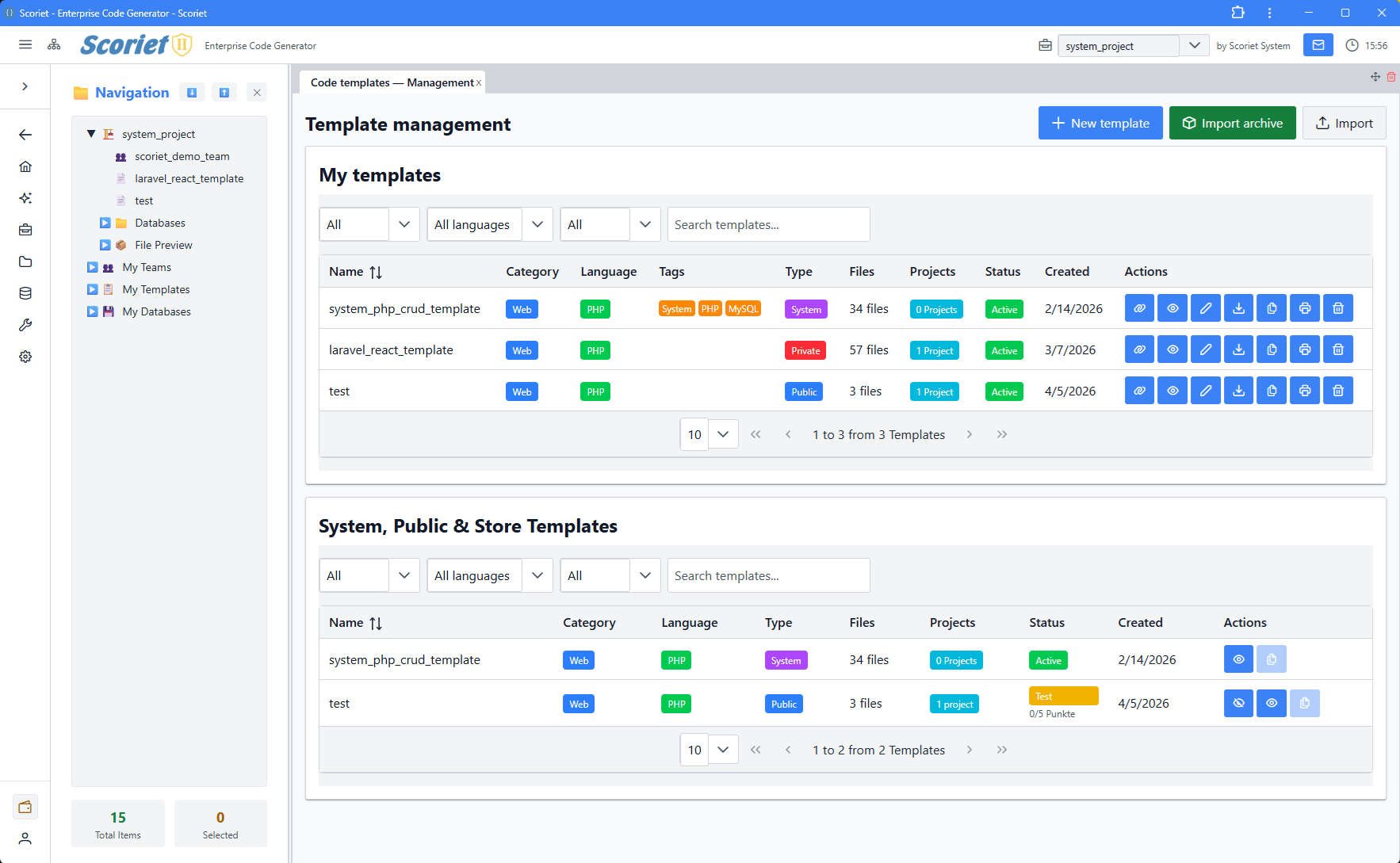 Template Management panel with template listing, filters, and action buttons
1. Template Variables
Template variables are placeholders that get replaced with actual values during code generation. They follow the syntax {:variablename:}.
System Variables (always available):
{:projectname:}- Project name{:tablename:}- Current table name{:fileName:}- Generated file name{:item.name:}- Current loop item field name{:item.type:}- Current loop item field type
Custom Variables:
- Defined in the template variables section
- Can be required or optional
- Language-specific values supported
- Multi-project value assignments
2. Loop Constructs
Loops iterate over collections of data from the schema.
{:for nmaxitems:}
  // Loop over all fields
  Field: {:item.name:}
{:endfor:}
Loop Contexts (different data sources):
fields- All fields in current tablefieldsnokey- All fields except primary keysfieldsnokeyall- All fields except any keysfieldsnoblob- Fields excluding BLOB typesconstraints- All constraints in tablekeys- All key fieldsforeign- All foreign key fields
Loop Variables:
{:nCount:}- Current iteration number (1-based){:i:}- Current iteration index (0-based){:item.*:}- Access current item properties{:nMaxItems:}- Total number of items in loop
3. Conditional Logic
Conditionals allow branching based on field properties or custom conditions.
{:if item.type == "VARCHAR":}
  String field: {:item.name:}
{:elseif item.type == "INT":}
  Integer field: {:item.name:}
{:else:}
  Other type: {:item.type:}
{:endif:}
Supported Operators:
- Equality:
==,!= - Comparison:
<,>,<=,>= - Logical:
&&,||,! - String matching:
contains,startswith,endswith
4. Switch/Case Statements
Switch statements handle multiple cases with automatic break insertion.
{:switch item.controltype:}
  {:case "text":}
    <input type="text" name="{:item.name:}" />
  {:case "number":}
    <input type="number" name="{:item.name:}" />
  {:default:}
    <input type="text" name="{:item.name:}" />
{:endswitch:}
Features:
- Auto-break insertion between cases (unless user manages breaks)
- Default case handling with
{:default:} - Alternative syntax with
{:othercase:}
5. Code Blocks
Inline JavaScript code blocks for complex logic.
{:code:}
  const fieldName = item.name.toUpperCase();
  return fieldName + '_ID';
{:codeend:}
Usage:
- Execute custom JavaScript functions
- Access full gtree data structure
- Perform calculations and string manipulations
- Return values for further processing
6. Template Functions
Built-in functions for common text transformations.
{:upper(item.name):}        // TABLENAME
{:lower(item.name):}        // tablename
{:capitalize(item.name):}   // Tablename
{:camelcase(item.name):}    // tableName
{:pascalcase(item.name):}   // TableName
{:snakecase(item.name):}    // table_name
{:kebabcase(item.name):}    // table-name
{:singular(item.name):}     // Remove plural
{:plural(item.name):}       // Add plural
{:length(item.name):}       // String length
{:substr(item.name,0,3):}   // Substring
{:replace(item.name,old,new):} // String replacement
7. Macros
Reusable template snippets with parameters.
{:macro name_macro parameter1 parameter2:}
  This is a macro body using {:parameter1:} and {:parameter2:}
{:endmacro:}

{:call name_macro "value1" "value2":}
8. Include Directives
Include reusable template files.
{:include: common/header.template:}
  Content goes here
{:include: common/footer.template:}
Validation
Template Syntax Validation
Before processing a template, validate syntax errors:
$engine = new UltimateTemplateEngine($gtree);
$validation = $engine->validateTemplateSyntax($templateContent);

if (!$validation['valid']) {
    foreach ($validation['errors'] as $error) {
        echo $error; // "Line 15: {:if:} requires a condition"
    }
}
Checks Performed:
- Matching opening/closing tags
- Valid condition syntax in conditionals
- Loop variable presence
- Nested structure depth (max 10 levels)
- Proper ordering of else/elseif
- Code block matching
Variable Validation
Validate that template variables are available:
$validation = $engine->validateVariablesWithContext(
    templateContent: $template,
    templateId: $templateId,
    projectId: $projectId,
    languageCode: 'en'
);

// Results include:
// - unknown_variables: not in system or template
// - required_missing: required but no project value
// - optional_missing: optional and no project value
Processing
Main Processing Function
Convert a template to a JavaScript function:
$engine = new UltimateTemplateEngine($gtree);

$jsFunction = $engine->processTemplate(
    templateContent: $templateContent,
    functionName: 'generateCode',
    tableIndex: 0,
    includeSource: true,      // Add source comments
    formWindowType: 0         // 0=none, 1=menu, 2=edit, 3=table
);

// Result is a JavaScript function string:
// function generateCode() {
//   let sContentResult = '';
//   // ... compiled template logic ...
//   return sContentResult;
// }
Variable Resolution
Variables are resolved in this order:
- Control Keywords - {:if:}, {:for:}, {:code:}, etc. (pass-through)
- Function Calls - {:upper(x):}, {:lower(x):}, etc.
- Prefixed Variables - {:item.:}, {:field.:}, {:project.*:}, etc.
- System Variables - Known template variables
- Custom Variables - User-defined template variables
- Unknown Variables - Resolved to JavaScript variables at runtime
Multi-Language Support
The template engine supports language-specific template variables:
$projectValues = ProjectTemplateVariableValue::where([
    'project_id' => $projectId,
    'template_id' => $templateId,
    'language' => 'de'  // German language
])->get();
Templates can have different values per language:
- Same template structure
- Language-specific variable values
- Support for 20+ languages
- Language-specific date/time formatting
Performance Optimizations
Index-Based Contexts
For large schemas with many fields, the engine uses index-based contexts instead of duplicating objects:
const INDEX_BASED_CONTEXTS = [
    'fieldsnokey',
    'fieldsnobloball',
    'fieldsnobinaryblob',
    'fieldssearchkeys'
];

// These store field indices instead of full objects
// Reduces memory usage by 50-70% for large schemas
Template Caching
Templates can be pre-compiled and cached:
// Enable in .env
TEMPLATE_CACHE_ENABLED=true
TEMPLATE_CACHE_TTL_HOURS=24
TEMPLATE_AUTO_PRECOMPILE=false
Benefits:
- Compilation time: ~21 min → 2-3 min (85-90% faster)
- Reduce database queries
- Enable batch pre-compilation
- Cache warming in background
Text Literal Protection
The engine protects string literals and escape sequences during processing:
Template line: echo "Hello\nWorld";
Protected: echo "Hello§NEWLINE§World";
Processed: [template logic...]
Restored: echo "Hello\nWorld";
This prevents escape sequences from interfering with template syntax parsing.
Smart Injection Tags
Special tags for code injection and section marking:
{:section name:}
  Content to be injected
{:sectionend:}

{:inject marker:}           // Simple injection point
{:inject marker;custom:}    // With custom name
These tags appear verbatim in compiled output for post-processing.
Best Practices
Template Design
-
Use Descriptive Variable Names
Good: {:projectClassName:}Bad: {:pc:} -
Break Complex Logic into Macros
// Instead of nested conditionals, extract to macro:{:macro renderField fieldType:}{:if fieldType == "text":}...{:endif:}{:endmacro:} -
Leverage Loop Contexts
// Use specific contexts to filter data:{:for fieldsnoblob:} // Skip BLOB fields -
Comment Complex Sections
{: This generates the database column definitions :}{:for fields:}{:endfor:}
Validation Before Generation
Always validate before generation:
// 1. Check syntax
$syntaxCheck = $engine->validateTemplateSyntax($template);
if (!$syntaxCheck['valid']) {
    return error($syntaxCheck['errors']);
}

// 2. Check variables
$varCheck = $engine->validateVariablesWithContext(
    $template, $templateId, $projectId
);
if (!empty($varCheck['required_missing'])) {
    return error("Missing required variables");
}

// 3. Process
$result = $engine->processTemplate($template);
Error Handling
Common Errors
| Error | Cause | Solution |
|---|---|---|
{:if:} requires a condition | Missing condition | Use {:if item.type == 'INT':} |
{:for:} requires a loop variable | Missing loop context | Use {:for nmaxitems:} or {:for fields:} |
Unknown variable | Variable not recognized | Check spelling, use system variables |
Unclosed {:if:} block | Missing {:endif:} | Ensure every if has matching endif |
Nested {:code:} blocks | Code blocks in code blocks | Extract to separate blocks |
Debugging
Enable source comments in processed templates:
$jsFunction = $engine->processTemplate(
    $template,
    includeSource: true  // Adds source comments
);

// Output includes:
// function generate() {
//   // Original template line: {:projectname:}
//   sContentResult += gtree[0].project[0].projectname;
//   // ...
// }